

If you’ve ever tried to answer the deceptively simple question “Where is this setting configured in Intune?”, you already know the pain. Settings Catalog, Templates, Compliance, ADMX… each with their own quirks, naming conventions, and UI paths. Hunting down a single CSP can turn into a full afternoon of clicking, exporting JSON, and hoping you didn’t miss something.
I built Intune Policy Search to end that misery. GitHub Link
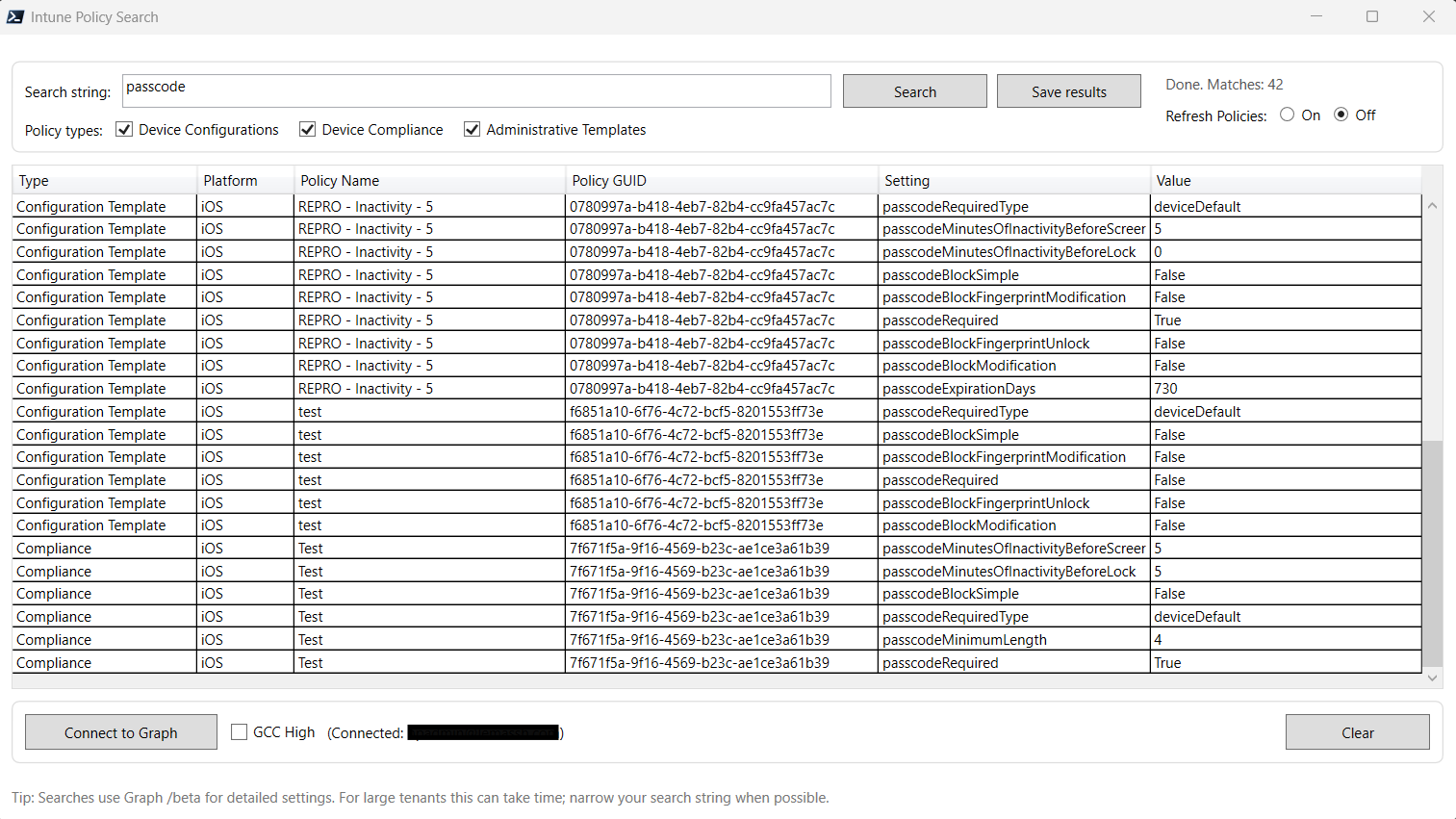
This new PowerShell + WPF tool gives you a single search box that scans all major Intune policy types at once and instantly tells you:
Where a setting is configured
What value it uses
Which policy type it lives in
The policy name and GUID
The platform it applies to
And yes, you can export everything to CSV with one click.
Why I Built This Tool
Admins shouldn’t need to memorize CSP names, dig through Graph responses, or click through every policy in the tenant just to answer basic configuration questions. Whether you’re troubleshooting, auditing, onboarding a new customer, or validating a baseline, you need answers fast.
Intune Policy Search solves that by:
Querying Microsoft Graph behind the scenes
Normalizing results across policy types
Giving you a clean, responsive UI
Supporting both Commercial and GCC High
Running on PowerShell 7+ and Windows PowerShell 5.1
If you can type a search term, you can find your setting.
What It Searches (and How)
The tool pulls and parses:
Settings Catalog
Searches CSP definition IDs and surfaces the full CSP path in the results.
Configuration Templates
Parses template objects and extracts configured values — even when Graph stores them in odd places.
Compliance Policies
Shows which compliance conditions are active and how they’re configured.
ADMX (Administrative Templates)
Displays imported ADMX settings and their applied values.
The current release matches on setting identifiers/names, not policy display names. Perfect for “find the CSP” workflows.
Authentication Options
You can connect in two ways:
App‑only (Client Secret)
Great for automation or service accounts.
Requires DeviceManagementConfiguration.Read.All with admin consent.
2. Interactive Sign‑In
Click Connect to Graph in the UI and authenticate normally.
Works in Commercial and GCC High (with a toggle in the UI).
Both methods are built directly into the tool — no extra scripts required.
How to Use It
Launch the script
Connect to Graph (choose GCC High if needed)
Type a search term
Example:
Defender,EdgeHomePage,RequireDeviceLockUse
*to return all configured settings across selected policy types
Select which policy types to include
Click Search
Export results to CSV if needed
The results grid shows:
Policy Type
Platform
Policy Name
Policy GUID
Setting Name
Value
Everything you need for fast triage or documentation.
Power‑User Tips
Wildcard sweeps (
*) are perfect for audits, MSP onboarding, or tenant baseliningLeave “Refresh Policies” off for faster searches using cached data
Use ADMX search to confirm imported templates and applied values
Export to CSV and diff over time to detect configuration drift
Start broad, then narrow — e.g.,
Defender*→ refine from there
Troubleshooting
A few quick notes to keep you moving:
Unauthorized?
You’re missingDeviceManagementConfiguration.Read.All.GCC High sign‑in issues?
Add your Tenant ID in the script header and toggle GCC‑H in the UI.No results?
Make sure you selected at least one policy type and search by setting name, not policy name.Slow in large tenants?
Disable “Refresh Policies” unless you truly need a fresh pull.
Installation
Install-Module Microsoft.Graph -Scope CurrentUser
Unblock-File .\IntunePolicySearch.ps1
.\IntunePolicySearch.ps1
For app‑only:
$ClientId     = '<your app id>'
$TenantId     = '<your tenant id>'
$ClientSecret = '<your client secret or $env:GraphKey>'
Wrap‑Up
Intune Policy Search gives you a single pane of glass for discovering where settings live across Intune. It’s fast, accurate, and without the endless clicking. Whether you’re validating a baseline, tracking down a rogue CSP, or auditing an entire tenant with *, this tool saves time and reduces error.
